How to Clean Your Car LCD Screen
By Chris Fiteni on Aug 20, 2026
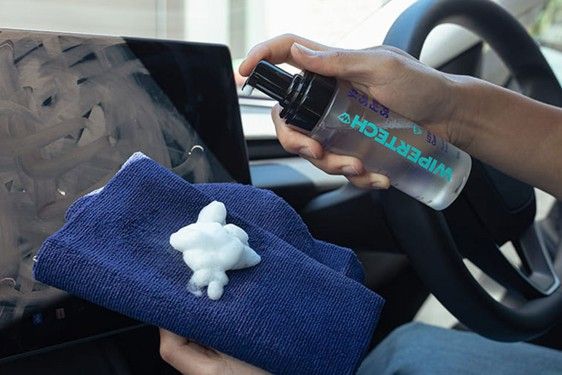
Your car's LCD screen is one of the most frequently touched surfaces in the cabin. Whether you're using it to navigate, adjust the climate controls, choose music or access other vehicle functions, fingerprints, dust and smudges can quickly build up.
Knowing how to clean your car's LCD screen properly is important. While it might seem like a straightforward job, using the wrong cleaning products or technique could damage the screen's protective coating or leave behind unwanted marks.
Fortunately, keeping your car's LCD screen clean doesn't need to be difficult. With the right approach and a few suitable cleaning supplies, you can keep it looking clear without risking damage.
Why Does Your Car LCD Screen Get Dirty?
Car LCD screens are exposed to plenty of everyday grime. Fingerprints are perhaps the most obvious culprit, particularly on touchscreen displays, but dust and airborne particles can also accumulate on the surface.
Australian driving conditions can make this particularly noticeable. Dusty roads, hot weather and the frequent use of air conditioning can all contribute to particles settling inside your vehicle. Sunscreen, oils from your fingers and other residues can also leave stubborn marks on the screen.
A dirty screen isn't necessarily just an aesthetic problem, either. Excessive fingerprints, glare and smudges can make information displayed on the screen harder to see, particularly when sunlight is shining directly into the cabin.
How to Clean Your Car's LCD Screen
If you're wondering how to clean car LCD screen in car, the process is relatively simple. The key is to be gentle and avoid introducing excessive moisture.
1. Turn the Screen Off
Before cleaning, switch off the vehicle and allow the LCD screen to cool down. A dark screen also makes fingerprints, dust and other marks easier to identify.
Cleaning a cool screen is preferable, particularly after the vehicle has been sitting in the Australian sun. You should ideally clean the screen somewhere shaded rather than immediately after driving.
2. Remove Loose Dust
Start by gently removing any loose dust or debris from the screen using a clean, soft microfibre cloth.
Don't apply significant pressure. Dust particles can contain tiny abrasive particles that may scratch a screen if they're dragged firmly across its surface.
Avoid using paper towels, tissues or rough cloths, as these can potentially leave fibres behind or cause fine scratches.
3. Wipe the Screen Gently
Once loose dust has been removed, use a clean microfibre cloth to gently wipe the screen.
Work with light pressure and use straight or gentle circular movements. There's no need to scrub hard, even if you encounter a stubborn fingerprint. Applying excessive pressure won't necessarily clean the screen more effectively and could potentially damage the display.
For routine cleaning, a slightly dampened microfibre cloth may be all that's required. However, better results can be achieved with a purpose-built LCD screen cleaner.
4. Deal With Stubborn Marks Carefully
If fingerprints or other residue remain, further dampen the microfibre cloth with an appropriate screen-safe cleaning solution.
Importantly, don't spray cleaning fluid directly onto the LCD screen. Instead, apply a small amount to the cloth before wiping the display. This helps prevent liquid from finding its way into gaps around the screen, buttons or surrounding trim.
Always check your vehicle manufacturer's recommendations before using any cleaning product on the display.
5. Finish With a Clean Microfibre Cloth
Once you've removed the marks, use a separate, dry microfibre cloth to gently buff away any remaining moisture or streaks.
Take a moment to inspect the screen from different angles. This will help you identify any remaining fingerprints or smears that may not have been immediately visible.
What Should You Avoid When Cleaning a Car LCD Screen?
Knowing what not to do is just as important as knowing how to clean your car's LCD screen.
Avoid using abrasive cleaners, harsh household chemicals, solvents or products that aren't designed for use on electronic displays. You should also avoid rough cloths, excessive water and excessive pressure.
It's particularly important not to pour or spray liquid directly onto the screen. Even a small amount of liquid getting into the edges of an LCD display could potentially cause problems.
You should also resist the temptation to use household glass cleaner simply because the screen looks like glass. LCD displays can have coatings that may be affected by unsuitable cleaning chemicals.
How Often Should You Clean Your Car LCD Screen?
There's no fixed schedule for cleaning your car's LCD screen. For most drivers, a quick wipe with a clean microfibre cloth whenever fingerprints become noticeable should be sufficient.
A more thorough clean can be performed whenever the screen develops visible smudges or grime. Drivers who frequently use their touchscreen may find that it needs cleaning more often.
Regular, gentle cleaning is generally preferable to allowing grime to build up and then attempting to remove it aggressively.
Keep Your Car's Screens and Glass Clean With Wipertech
Cleaning your car's LCD screen is a simple job, provided you use the right materials and take a gentle approach. A clean microfibre cloth, an appropriate screen-safe cleaning solution and a little patience can make a significant difference.
For drivers looking for a convenient car glass cleaning kit that can help with keeping their vehicle looking its best, Wipertech offers dedicated Car Cleaning Kits. These kits provide useful cleaning supplies for maintaining your vehicle's glass and surfaces, making it easier to keep your car clean inside and out.
So, the next time fingerprints and dust start building up on your LCD screen, don't reach for an unsuitable household cleaner. With the right cleaning kit and a careful approach, you can keep your car's display looking clean, clear and ready for your next journey.
Chris Fiteni
on Aug 20, 2026